Meet Cymetryc

Purpose-built to modernize software validation

Increase your validation velocity, quality and regulatory compliance

Across all applications, all vendors and all types of validation efforts. Cymetryc gives everyone on the project the tools for their part, from planning and hands-on testing to issue tracking, approval and inspection-ready proof.

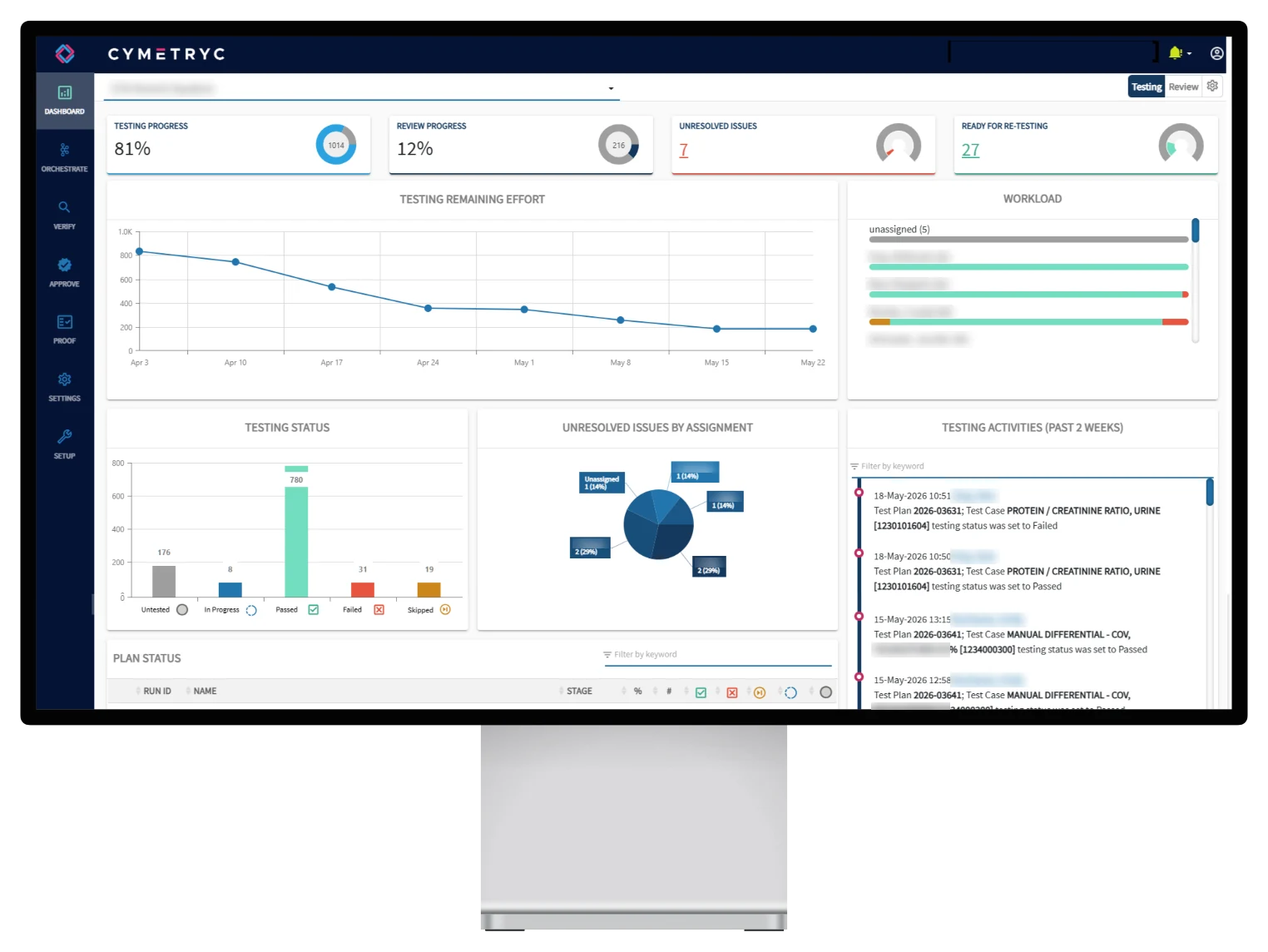
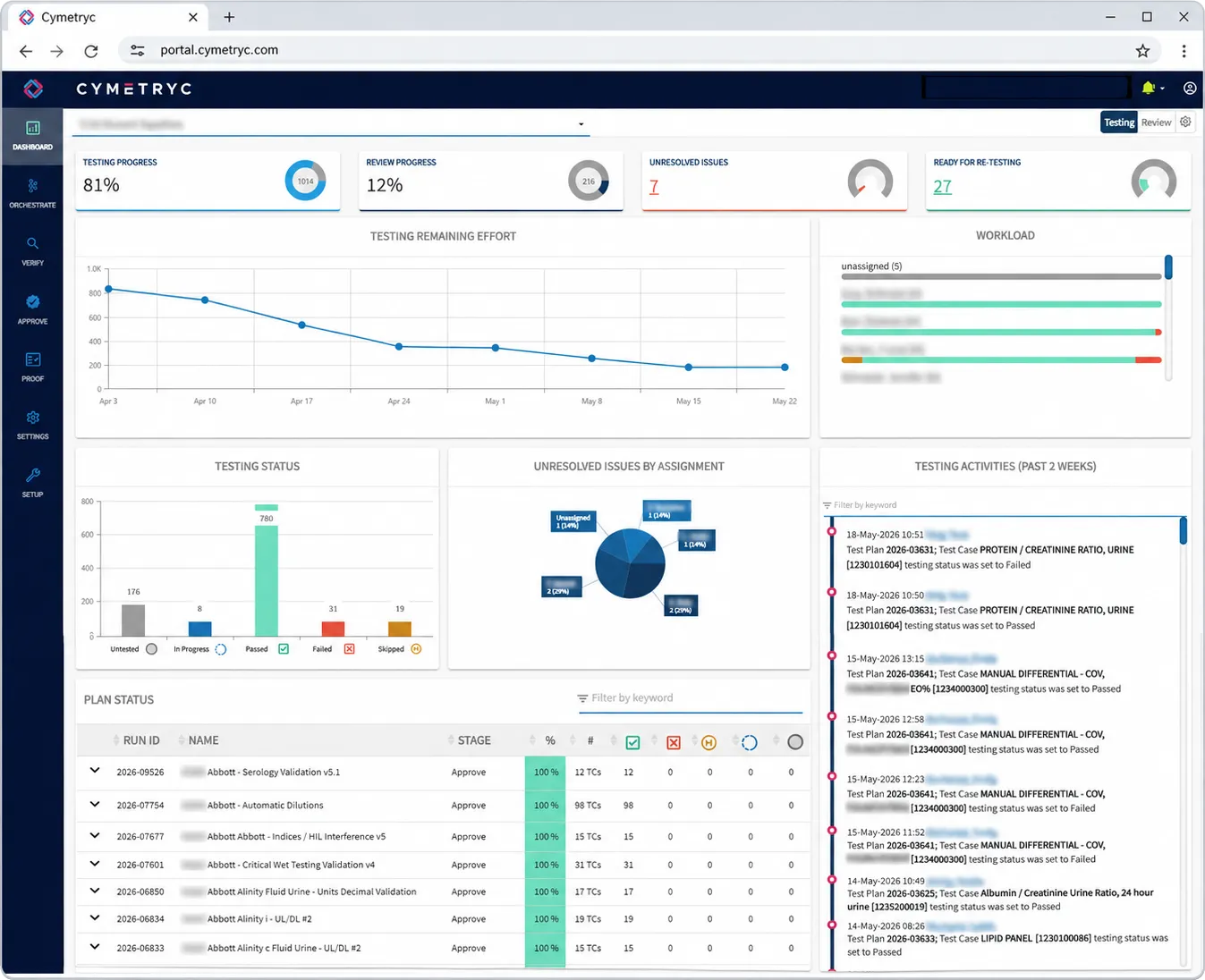
Cymetryc dashboard showing testing progress, results and issues on a desktop monitor

Up to 60%

faster testing, with 40% the typical saving, because testers test and project managers coordinate

15 min

or less of video training for approvers, who need only a browser

Free

conversion of your existing Excel or Word test cases into Cymetryc during onboarding

Why change

What changes when testing leaves the spreadsheet

Most validation and UAT still happens in Word, Excel, email and shared drives. Here's what that looks like day to day, and what Cymetryc does instead.

Task

Spreadsheets, email & shared drives

With Cymetryc

Status updates

Spreadsheets & email

Chasing testers by email; reports are out of date before they're sent

With Cymetryc

Dashboards update live as testers work

Evidence

Spreadsheets & email

Screenshots pasted into Word and saved to shared drives

With Cymetryc

Captured in context and attached to the test step automatically

Issues

Spreadsheets & email

Email threads and a separate issue log

With Cymetryc

Raised from the failed step with its evidence, then tracked through retest

Consistency

Spreadsheets & email

Every team writes and tests its own way

With Cymetryc

One methodology and shared templates across teams and sites

Approvals

Spreadsheets & email

Binders and PDFs, reviewed at the very end

With Cymetryc

Reviewed in a browser as testing completes

Inspection evidence

Spreadsheets & email

Weeks spent assembling binders

With Cymetryc

Inspection-ready Word reports in a click

The next project

Spreadsheets & email

Hunting through old files and starting again

With Cymetryc

A reusable test case repository and templates

How testing works in Cymetryc

One proven methodology for every testing event

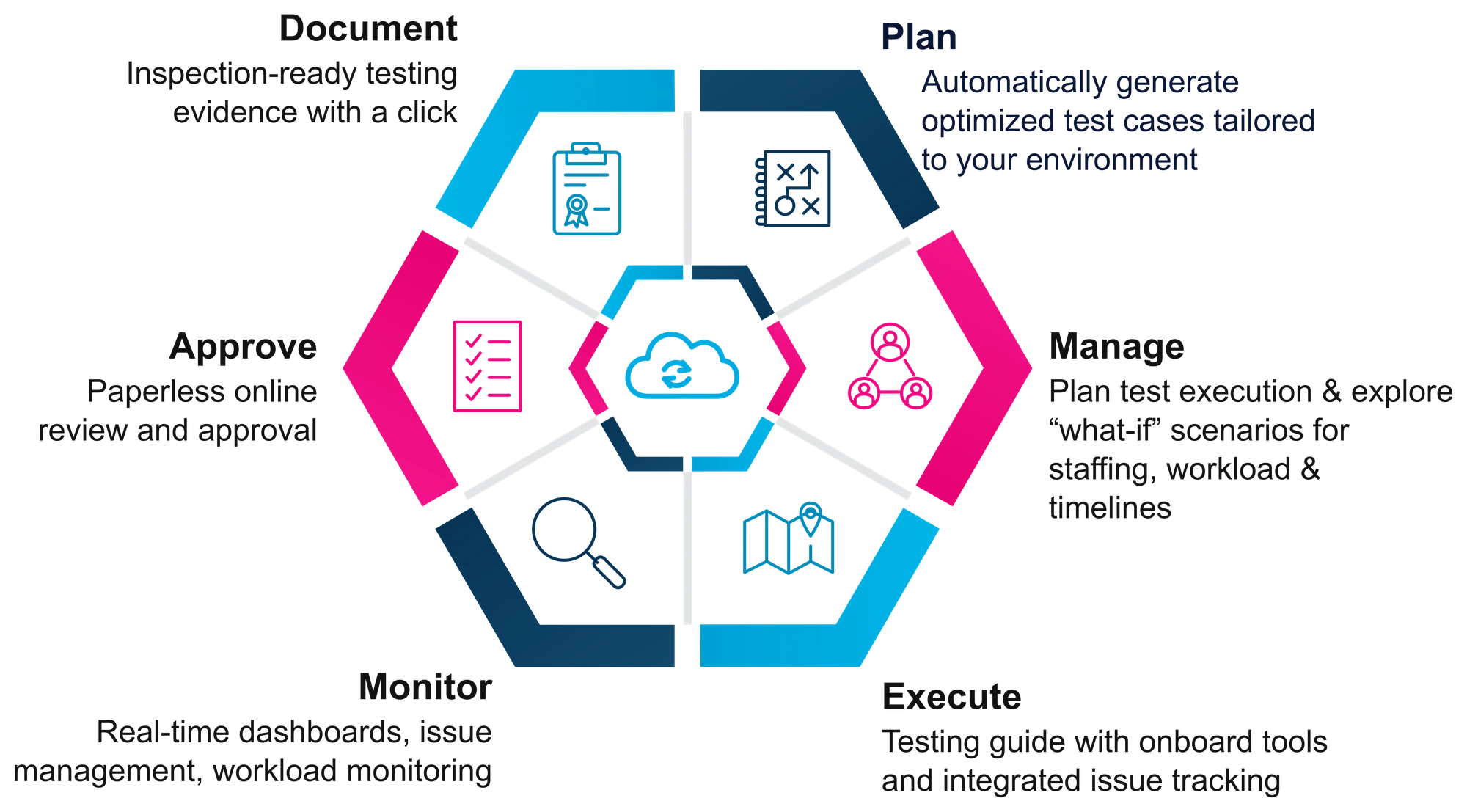
In Cymetryc, a testing project is called an event. An upgrade, a new instrument, an EHR release or a patch can each be an event, and you can have as many in flight as you need. Every event moves through the same cycle: plan, manage, execute, monitor, approve and document. Then repeat for the next one.

The Cymetryc testing cycle: plan, manage, execute, monitor, approve and document

Three terms you'll hear

Event

A testing project, such as an upgrade, a new system or a patch. Keep as many open side by side as you need; each follows the same cycle.

Test plan

A logical grouping of test cases, for example by type of testing, so hundreds or thousands of test cases stay organized and easy to assign.

Test case or test script

The steps a tester follows, with instructions and expected outcomes. US teams tend to say test case and UK teams test script; they mean the same thing.

Feature tour

Every stage of the cycle, in one platform

Follow one event from the first test case to the final report. Jump to any stage with the menu below.

01 · Plan · Orchestrate

Never start from a blank sheet of paper

Every event starts with knowing what needs to be tested. Test cases live in a central repository so you can reuse them event after event, and test plans group them into logical sets that make sense for your testing.

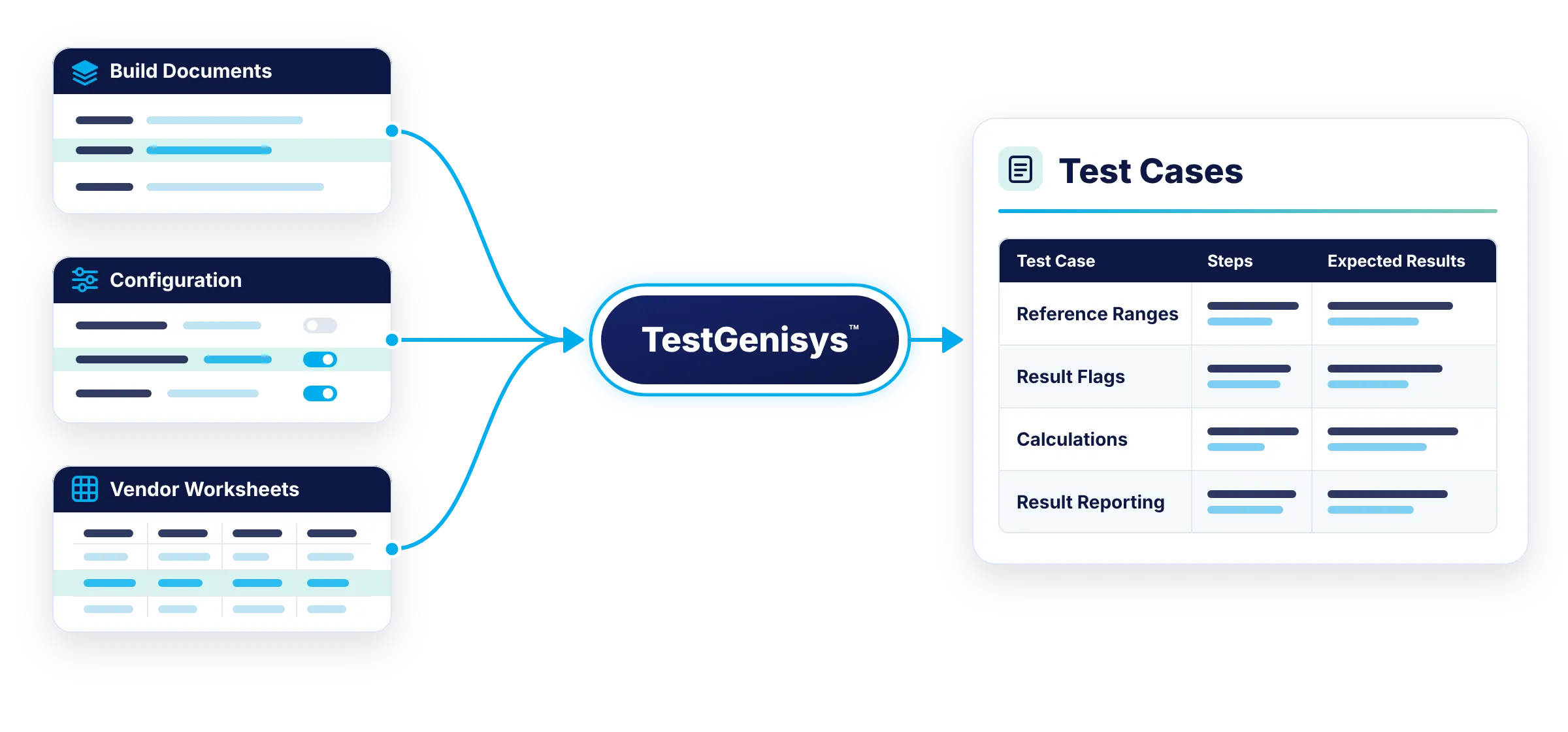
TestGenisys builds customized test cases from your source-of-truth documents, such as build specifications, configuration and vendor data collection worksheets

Upstream and downstream activities can be included, so your portfolio covers the workflow end to end

Already have test cases you like in Excel or Word? We bring them into Cymetryc during onboarding at no extra charge

Build testing templates with import wizards or copy and paste, then deploy them across events and sites

More about TestGenisys →

TestGenisys turns build documents, configuration and vendor worksheets into test cases with steps and expected results

02 · Manage · Orchestrate

Assign the work before testing starts

Set scope and resources at the start. Assign test cases to one person or to several, where whoever gets there first picks it up, and assign reviewers and approvers at the same time. When the environment is ready, switch the event into execution and everyone is notified by email.

Reassign test cases in a few clicks when someone is out unexpectedly, so progress keeps moving

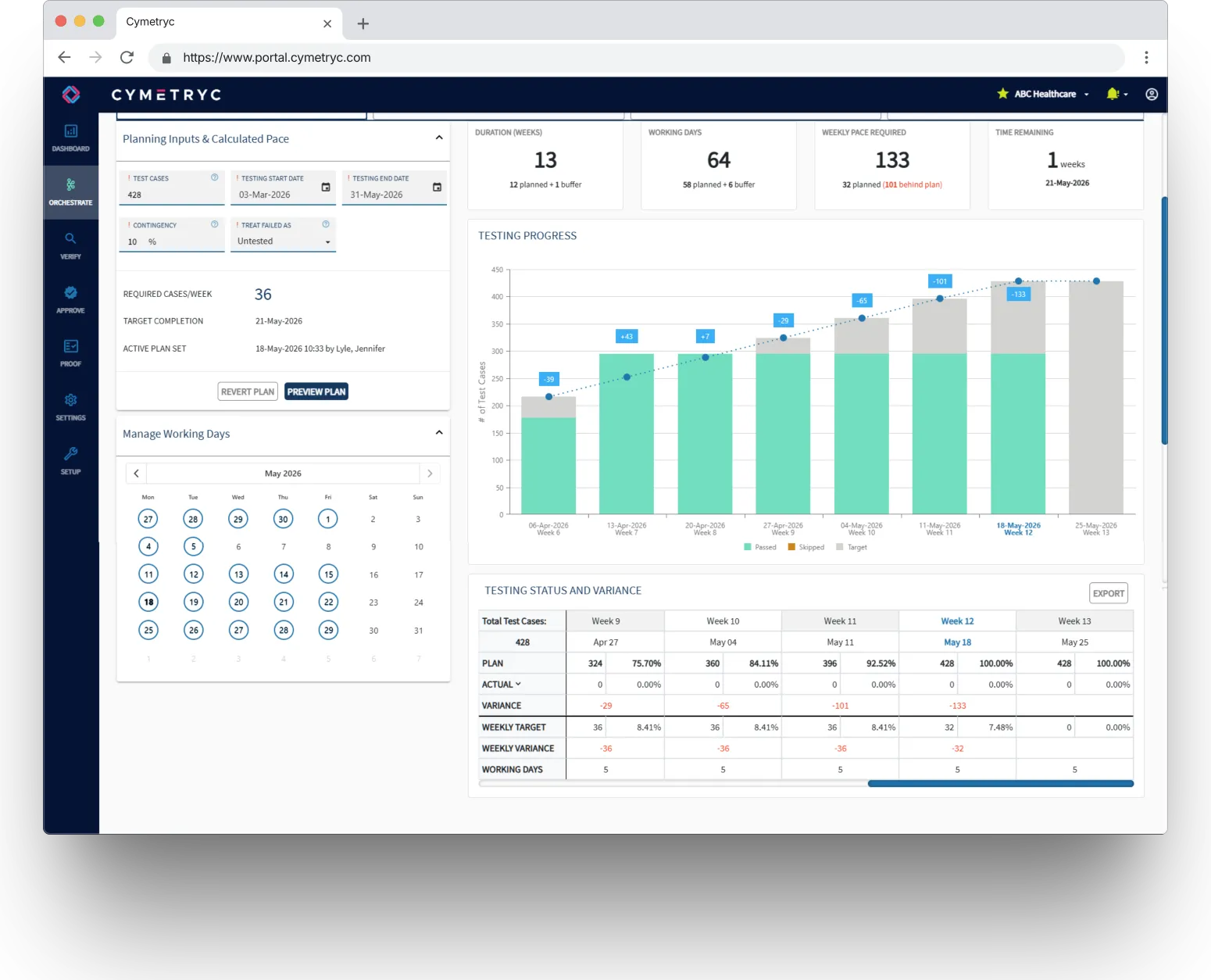
The execution planner turns your dates, working days and contingency into a weekly target

Track variance week by week, so you and your vendor know early whether go-live is on track

Approvers can be notified as testing completes, not at the very end

More about Execution Planning →

Cymetryc execution planner showing weekly targets and progress against plan

03 · Execute · Verify

A testing guide right next to the application

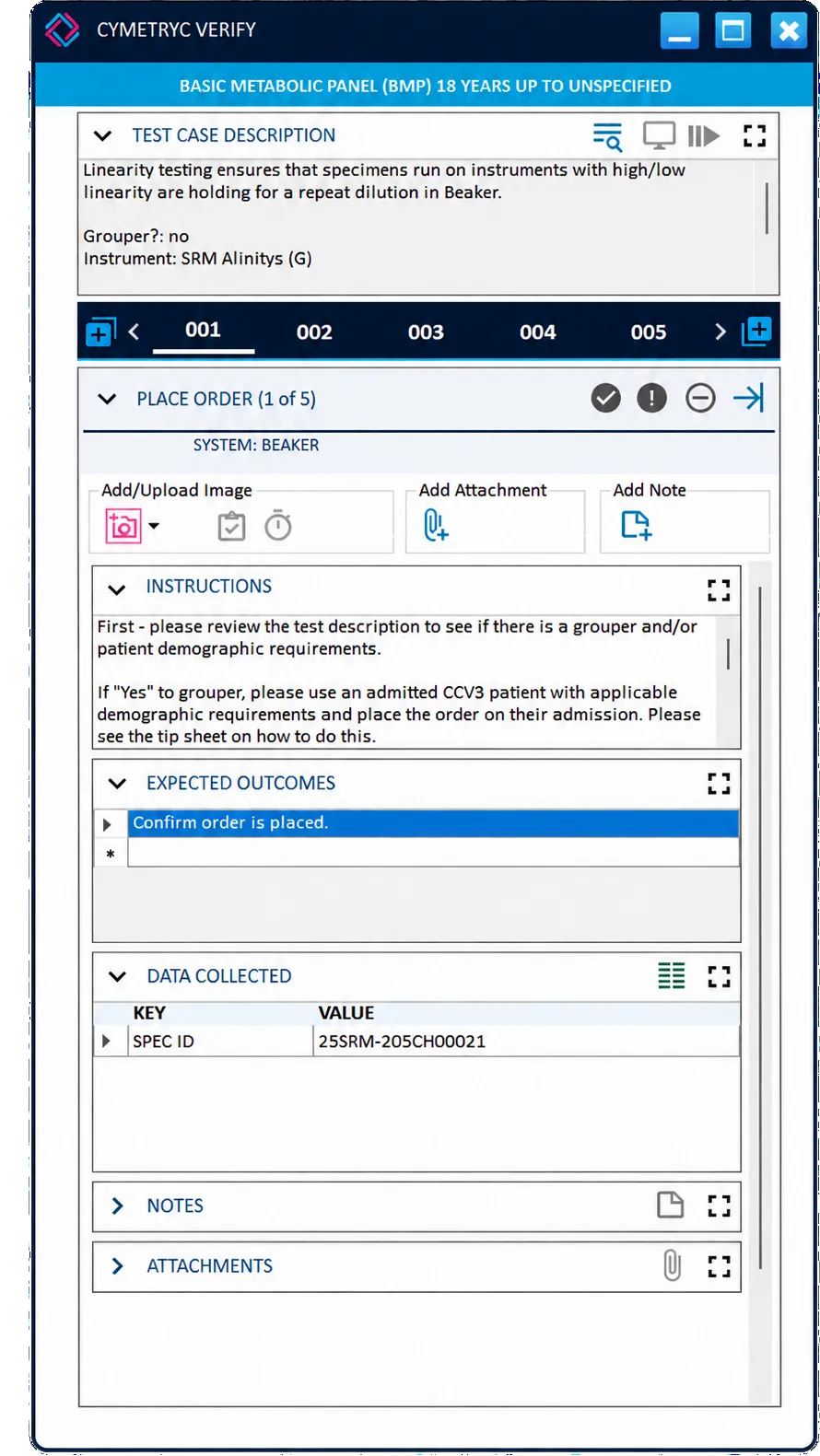
Verify is a testing guide that sits beside whatever application is being tested. The people testing are usually subject matter experts doing it alongside their day jobs, so interruptions are a given. Verify shows the instructions and expected outcome for every step and keeps their place.

Screen capture, clipboard images, timed captures, attachments and notes, all in context

Required screenshots: a step can't be passed until the evidence is captured

Annotate or redact screenshots, and apply one screenshot to several test cases at once

Store key data, like an order or specimen number, that follows the test case from step to step

Pass, fail or skip each step, and the dashboards update as testers work

Why a desktop app? Capturing screens of other applications from a browser isn't good security practice, so test execution happens in Verify. Verify stores no data locally; everything else in Cymetryc is in the cloud.

Cymetryc Verify testing guide with test steps, instructions and evidence capture tools

04 · Execute · Issue tracking

Log issues without leaving the test

When something looks wrong, testers raise an issue from the failed step in a few clicks. Every piece of evidence captured so far is attached automatically, and they get straight back to testing.

Severity and status, plus type and system fields you define per event, for triage

Assign, discuss and track each issue to resolution, with the full history kept

Link the vendor's ticket number and URL, and share a direct link to the issue

Whoever fixes it sees the failed step, its screenshots and every step before it

Marked ready for testing, the test case goes back to the tester for retest

05 · Monitor

See progress as it happens

Dashboards update as testers work, so project managers and stakeholders can see where testing stands, who is doing what and what is holding things up, without chasing anyone for an update.

Completion, pass and fail counts, assignments and workload at a glance

Burndown, plus a two-week activity feed of who did what, searchable by keyword

Issue dashboards show what's unresolved, who has it and where the bottlenecks are

A review dashboard tracks approvals alongside testing

Event activity, issue management and user login reports whenever you need them

Cymetryc testing dashboard showing progress, results and activity

06 · Approve · Cymetryc Approve

Paperless review and approval from anywhere

Approvers get an email when testing is ready for them, follow the link and see everything the tester saw and captured. Review happens alongside testing instead of being crammed in at the end, when approvers have the least time to apply their expertise.

Just a browser: a laptop, a home PC or a tablet, with no desktop app

See the instructions, each step, the captured data and every screenshot

Approve or reject step by step, by expected outcome, or the whole test case at once

Return for rework with comments, or raise an issue the tester missed

Multiple approval levels, such as a supervisor first and then the medical director

Approver training is a video of under 15 minutes

Approver reviewing a test case in Cymetryc Approve on a desktop monitor

07 · Document · Cymetryc Proof

Inspection-ready reports with a click

Cymetryc is self-documenting. Everything captured along the way flows into standardized reports, so every facility and team produces the same documentation regardless of application, and no one spends weeks assembling it.

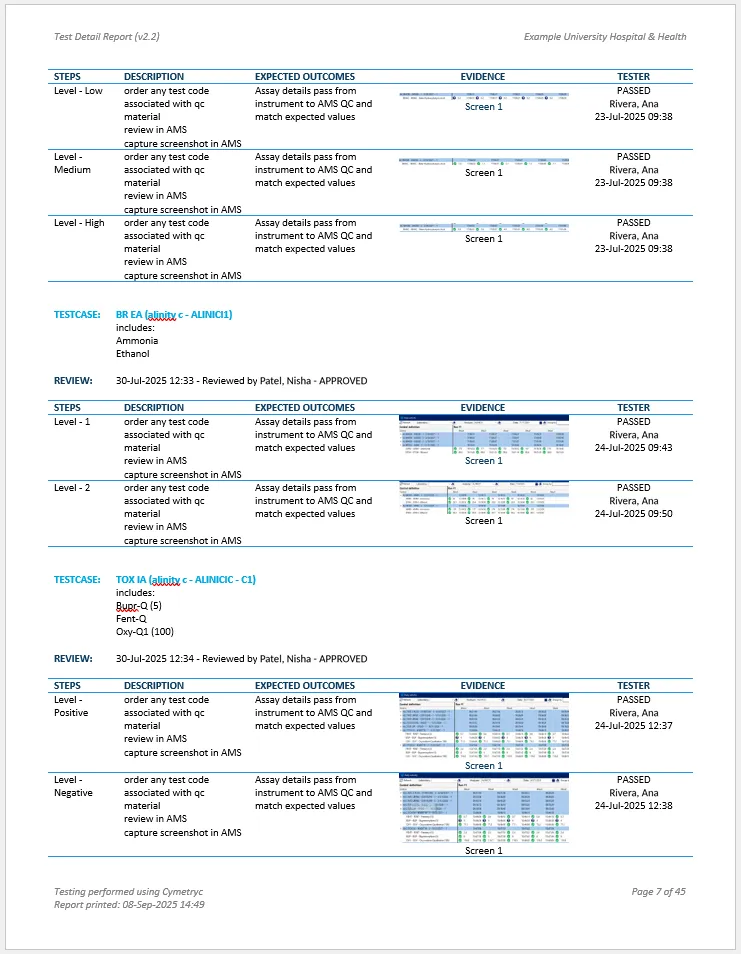
Detail report: cover page with your organization's name, table of contents, steps, expected outcomes, embedded screenshots and issues

Who tested and approved what, and when, including rejections and rework

Summary report: the event roll-up across every test plan, with an optional sign-off page

Delivered as Word (docx) so you can zoom into screenshots, search, lock and file them in your QMS

Designed for FDA, CAP, CLIA and Joint Commission requirements in the US and UKAS in the UK

Cymetryc Proof detail report with test steps, approvals and embedded screenshots

Application agnostic

Works with every application you need to test

Client-server or cloud, from any vendor, however it's delivered. If it needs testing, Cymetryc can guide it, from your most critical systems to the dozens of smaller ones.

EHRs and EPRs

LIS and LIMS

Middleware

Instruments and analyzers

Billing and finance systems

HR systems such as Workday

New implementations

Upgrades and patches

Change logs

Security and hosting

Secure by design, built for regulated work

Independently certified

SOC 2 Type 2 and ISO 27001:2022, and HIPAA and GDPR compliant.

Encrypted and segregated

TLS 1.2 in transit and AES-256 at rest, with each customer's data in its own dedicated database.

No patient data

Test environments use synthetic data, so Cymetryc never needs PHI. Separate US and UK instances keep each customer's data in its own country.

Ready for Part 11 and Annex 11

A tamper-evident audit trail and electronic signatures that record who signed, when and why, supporting FDA 21 CFR Part 11 and EU Annex 11.

Built for every role

One platform, every person on the project

Project managers, testers, approvers and quality leads each get the tools for their part of the work, and everyone works from the same record.

Questions we hear

Frequently asked questions

Is Cymetryc a test automation tool?

No. Your subject matter experts do the testing. Cymetryc guides them through each step, captures their evidence and keeps everything connected and traceable, from the first test case to the final report.

Is this the same as clinical or analytical validation?

No. Cymetryc is for software validation: the verification, validation and user acceptance testing of the applications your teams rely on. Analytical studies such as method comparisons and linearity are a different discipline.

What can we test with Cymetryc?

Any application, from any vendor, whether it's client-server or cloud. Teams use it for EHRs and EPRs, LIS and LIMS, middleware, instruments, billing and business systems, and for new implementations, upgrades, patches and change logs.

Can we use the test cases we already have?

Yes. If your test cases are in Excel or Word, we bring them into Cymetryc during onboarding at no extra charge. If you're starting fresh, TestGenisys can generate test cases from your build documents and vendor worksheets.

What does everyone need to install?

Testers use the Verify desktop app to execute tests and capture screenshots. Everyone else, including project managers, approvers and stakeholders, just needs a web browser.

How much training do approvers need?

Very little. Approver training is a video of under 15 minutes that they can rewatch any time.

Where do the final reports live?

In your quality management system. Cymetryc produces detail and summary reports in Word, which you download, lock and file in your QMS.

Does Cymetryc store patient data?

No. Testing should use synthetic test data, and the only personal information Cymetryc stores is the name and email address of each user. Data is encrypted in transit and at rest, and each customer has a dedicated database.

Where is Cymetryc hosted?

On Microsoft Azure, with separate US and UK instances. Cymetryc holds SOC 2 Type 2 and ISO 27001:2022 certification and is HIPAA and GDPR compliant.

Ready to see it for yourself?

We'll walk you through Cymetryc using the kind of testing your team does every day.